How to Integrate KYB From A to Z with VOVE ID
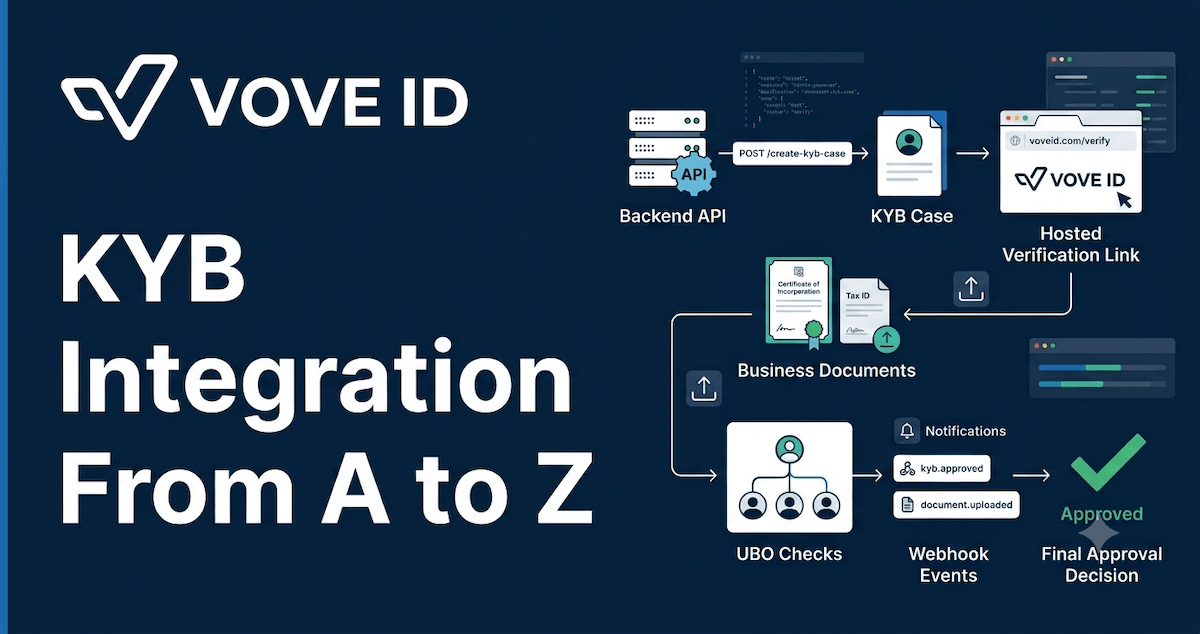
VOVE ID helps teams verify business customers without building an entire KYB operations workflow from scratch. The integration is simple at the API level: configure your credentials and KYB flow, create a KYB case from your backend, send the business a secure verification link, listen for webhooks, and retrieve the latest verification result for your own review workflow.
This tutorial walks through the full KYB integration from setup to production handoff, with backend code snippets you can adapt to your own onboarding flow.
What you will build
By the end, your application will be able to:
- Store VOVE ID credentials securely on the backend
- Create a KYB verification case for a business customer
- Generate the hosted KYB verification link
- Track case statuses from
NOT_STARTEDtoCOMPLETEDorREJECTED - Receive webhook updates for KYB and UBO events
- Retrieve the final KYB case result before your team makes the onboarding decision
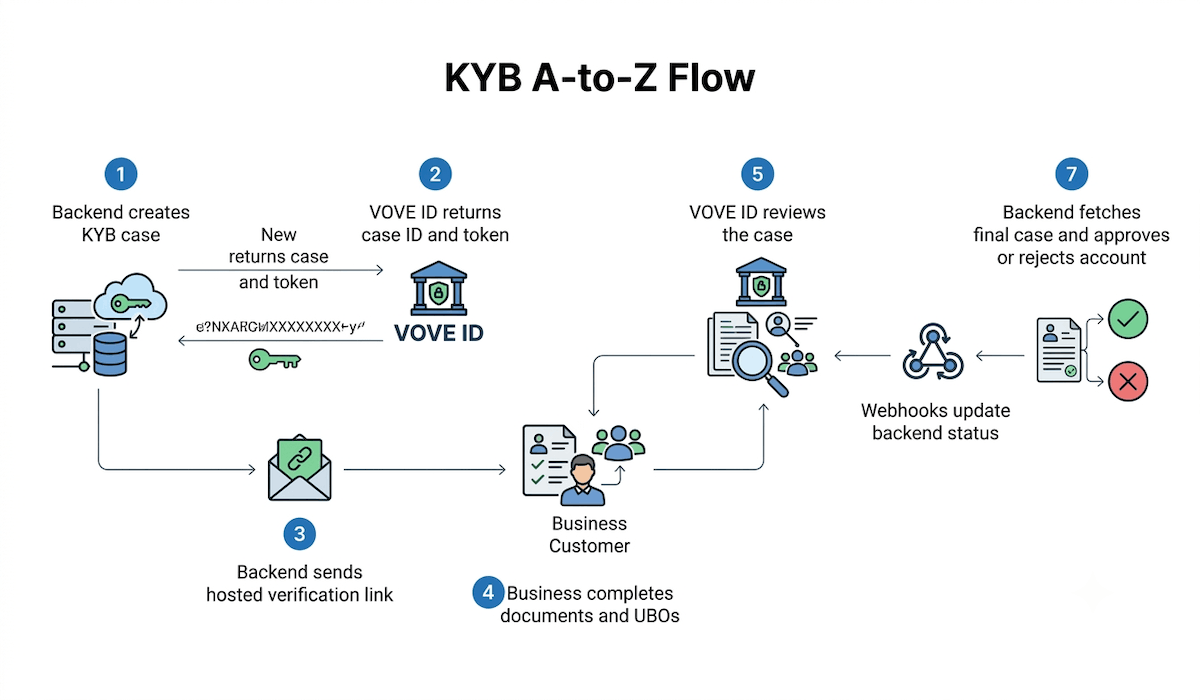
The flow looks like this:
- Your backend creates a KYB case.
- VOVE ID returns your
refId, initial status, flow ID, and a short-lived token. - Your backend builds a hosted verification link using that token and your public key.
- The business customer completes documents, business data, business search, UBO invitations, and submission in the hosted KYB portal.
- Your operations or compliance team reviews the submitted KYB outcome.
- Your backend receives webhook updates and retrieves the latest verification record.
- Your product grants access, requests remediation, or rejects onboarding based on your team's decision.
Before you start
You need three things from VOVE ID before writing code:
- A registered VOVE ID account
- Dashboard access for your organization
- Your API key and public key
Keep the API key on your backend only. Do not place it in client-side JavaScript, mobile apps, public repositories, or static configuration. Use environment variables or your secret manager.
VOVE_ID_API_KEY="your_server_side_api_key"
VOVE_ID_PUBLIC_KEY="your_public_key_from_dashboard"
VOVE_ID_ENVIRONMENT="Sandbox"
VOVE_ID_API_BASE_URL="https://api.voveid.net/v2"
VOVE_ID_WEBHOOK_SECRET="your_webhook_signing_secret"
Use the sandbox API base URL while testing:
https://api.voveid.net/v2
Use the production API base URL when you are ready to go live:
https://api.voveid.com/v2
Step 1: Configure your KYB flow
A KYB flow defines what a business must complete for a specific jurisdiction. It can include required documents, business registry checks, UBO verification, and optional steps such as website analysis.
Start in the VOVE ID dashboard:
- Open the dashboard.
- Go to the flow configuration area.
- Select or create a KYB flow for the business jurisdiction you need.
- Confirm which documents and UBO checks are required.
- Store the flow ID if you want to target this flow explicitly from your backend.
If you do not pass a custom flow ID, use the default flow for the business country. For custom compliance programs, it is better to choose the flow intentionally so the onboarding requirements are predictable.
Step 2: Model KYB in your backend
Before calling VOVE ID, create a local record for the business in your system. The most important field is refId, because it links your database record to the VOVE ID KYB case.
Use a stable internal ID, not an email address or mutable business name.
type BusinessOnboarding = {
  id: string;
  legalName: string;
  country: string;
  registrationNumber?: string;
  city?: string;
  address?: string;
  voveKybRefId: string;
  kybStatus:
    | "NOT_STARTED"
    | "IN_PROGRESS"
    | "IN_REVIEW"
    | "COMPLETED"
    | "REJECTED";
};

function buildKybRefId(businessId: string) {
  return `business_${businessId}`;
}
The KYB status lifecycle you should expect is:
NOT_STARTED: the case exists, but the business has not startedIN_PROGRESS: the business is completing the hosted stepsIN_REVIEW: the business has submitted the case for reviewCOMPLETED: the verification record is complete and ready for your team's decisionREJECTED: the verification result needs review, remediation, or an offboarding workflow
Step 3: Create the KYB case
Create KYB cases from your backend. The endpoint is:
POST /kyb/case
Content-Type: application/json
x-api-key: YOUR_API_KEY
Here is a small TypeScript helper using fetch:
const VOVE_API_BASE_URL =
  process.env.VOVE_ID_API_BASE_URL ?? "https://api.voveid.net/v2";

type CreateKybCaseInput = {
  businessName: string;
  refId: string;
  flow?: string;
  formData?: {
    registrationNumber?: string;
    country?: string;
    city?: string;
    address?: string;
  };
};

type CreateKybCaseResponse = {
  kybCase: {
    refId: string;
    status: "NOT_STARTED";
    flow?: string;
  };
  token: string;
};

export async function createVoveKybCase(
  input: CreateKybCaseInput
): Promise<CreateKybCaseResponse> {
  const response = await fetch(`${VOVE_API_BASE_URL}/kyb/case`, {
    method: "POST",
    headers: {
      "Content-Type": "application/json",
      "x-api-key": process.env.VOVE_ID_API_KEY ?? "",
    },
    body: JSON.stringify(input),
  });

  if (!response.ok) {
    const errorBody = await response.text();
    throw new Error(`VOVE KYB case creation failed: ${response.status} ${errorBody}`);
  }

  return response.json() as Promise<CreateKybCaseResponse>;
}
Call it when a business reaches the KYB step in onboarding:
const kybCase = await createVoveKybCase({
  businessName: business.legalName,
  refId: buildKybRefId(business.id),
  flow: process.env.VOVE_ID_KYB_FLOW_ID,
  formData: {
    registrationNumber: business.registrationNumber,
    country: business.country,
    city: business.city,
    address: business.address,
  },
});

await db.businessOnboarding.update({
  where: { id: business.id },
  data: {
    voveKybRefId: kybCase.kybCase.refId,
    kybStatus: kybCase.kybCase.status,
  },
});
Pre-fill as much accurate business data as you can. It reduces customer friction, but inaccurate pre-filled data can slow down review, so only send values you trust.
Step 4: Generate the verification link
After case creation, VOVE ID returns a token for the business to access the hosted KYB portal. Use it to build the verification link on your backend:
type VoveEnvironment = "Sandbox" | "Production";

export function buildKybVerificationLink(params: {
  token: string;
  publicKey: string;
  environment: VoveEnvironment;
}) {
  const url = new URL("https://web.voveid.com/kyb/");
  url.searchParams.set("authToken", params.token);
  url.searchParams.set("publicKey", params.publicKey);
  url.searchParams.set("environment", params.environment);
  return url.toString();
}
Example:
const verificationLink = buildKybVerificationLink({
  token: kybCase.token,
  publicKey: process.env.VOVE_ID_PUBLIC_KEY ?? "",
  environment:
    process.env.VOVE_ID_ENVIRONMENT === "Production" ? "Production" : "Sandbox",
});
Send the link to the business customer by email, show it in your onboarding UI, or route the user to it from your application. Treat the link as sensitive because the token grants access to the hosted verification session. The token is valid for 24 hours, so your product should handle expired links by creating or refreshing the case flow through your backend.
Step 5: Let the business complete KYB
The hosted KYB portal guides the customer through the required steps in your flow. Depending on configuration, this can include:
- Uploading company registration certificates, licenses, or other business documents
- Filling business profile fields such as registration number, country, city, and address
- Searching official registries for the business
- Adding Ultimate Beneficial Owners
- Having UBOs complete their own KYC verification
- Submitting the KYB record for your team's review
Your app should show a simple "verification in progress" state while this is happening. Avoid approving the business account just because a case was created. Case creation means the workflow has started; access should only be granted after the verification record reaches COMPLETED and your team has accepted the outcome.
Step 6: Add a webhook endpoint
Webhooks are the cleanest way to keep your application in sync. Configure your endpoint in the VOVE ID dashboard under Settings -> Webhooks, select the KYB events you want, and store the signing secret.
Your production webhook endpoint must:
- Accept
POSTrequests - Use HTTPS
- Return a 2xx response within 15 seconds
- Verify the webhook signature
- Handle duplicate deliveries safely
Useful KYB events include:
kyb.case.createdkyb.case.status.changedkyb.case.completedkyb.case.rejectedkyb.ubo.invitedkyb.ubo.completed
Here is an Express-style handler:
import crypto from "node:crypto";
import express from "express";

const app = express();

app.use(
  express.json({
    verify: (req, _res, buf) => {
      (req as express.Request & { rawBody?: string }).rawBody = buf.toString();
    },
  })
);

function verifyWebhookSignature(params: {
  rawBody: string;
  signature: string;
  secret: string;
}) {
  const expected = crypto
    .createHmac("sha256", params.secret)
    .update(params.rawBody)
    .digest("base64");

  const received = Buffer.from(params.signature);
  const calculated = Buffer.from(expected);

  if (received.length !== calculated.length) {
    return false;
  }

  return crypto.timingSafeEqual(received, calculated);
}

app.post("/webhooks/vove-kyb", async (req, res) => {
  const signature = req.header("svix-signature");
  const rawBody = (req as express.Request & { rawBody?: string }).rawBody;
  const secret = process.env.VOVE_ID_WEBHOOK_SECRET;

  if (!signature || !rawBody || !secret) {
    return res.status(400).send("Missing webhook verification data");
  }

  if (!verifyWebhookSignature({ rawBody, signature, secret })) {
    return res.status(401).send("Invalid signature");
  }

  const event = req.body as {
    id?: string;
    type: string;
    data: Record<string, unknown>;
  };

  await handleVoveKybEvent(event);

  return res.status(200).send("OK");
});
Then route events into business actions:
async function handleVoveKybEvent(event: {
  id?: string;
  type: string;
  data: Record<string, unknown>;
}) {
  if (event.id) {
    const alreadyProcessed = await db.webhookEvent.findUnique({
      where: { providerEventId: event.id },
    });

    if (alreadyProcessed) return;
  }

  switch (event.type) {
    case "kyb.case.status.changed":
      await updateBusinessKybStatus(event.data);
      break;

    case "kyb.case.completed":
      await routeBusinessForReviewAfterFinalFetch(event.data);
      break;

    case "kyb.case.rejected":
      await routeBusinessForRemediation(event.data);
      break;

    case "kyb.ubo.invited":
    case "kyb.ubo.completed":
      await updateUboProgress(event.data);
      break;

    default:
      console.log(`Unhandled VOVE KYB event: ${event.type}`);
  }

  if (event.id) {
    await db.webhookEvent.create({
      data: {
        provider: "vove",
        providerEventId: event.id,
        type: event.type,
      },
    });
  }
}
Use a database-backed idempotency table in production. Webhooks can be retried, and retries should not double-enable an account or send duplicate customer emails.
Step 7: Retrieve the verification record before making the final decision
When you receive a completion or rejection webhook, fetch the latest KYB record from VOVE ID before making the final business decision. Use your refId to keep the integration aligned with your own business record. This gives your application the latest status, documents, UBOs, business search output, and website analysis fields available for review.
GET /kyb/case?search={refId}&limit=1
x-api-key: YOUR_API_KEY
TypeScript helper:
type KybCaseStatus =
  | "NOT_STARTED"
  | "IN_PROGRESS"
  | "IN_REVIEW"
  | "COMPLETED"
  | "REJECTED";

type VoveKybCase = {
  businessName: string;
  refId: string;
  status: KybCaseStatus;
  documents?: Array<{
    documentType: string;
    fileName: string;
    uploadedAt: string;
  }>;
  ubos?: Array<{
    refId: string;
    firstName: string;
    lastName: string;
    email: string;
    status: string;
    ownership?: number;
  }>;
  businessSearch?: {
    verified?: boolean;
    data?: unknown;
  };
  websiteAnalysis?: {
    status?: string;
    risk?: string;
    data?: unknown;
  };
};

export async function getVoveKybCaseByRefId(refId: string): Promise<VoveKybCase> {
  const url = new URL(`${VOVE_API_BASE_URL}/kyb/case`);
  url.searchParams.set("search", refId);
  url.searchParams.set("limit", "1");

  const response = await fetch(url, {
    headers: { "x-api-key": process.env.VOVE_ID_API_KEY ?? "" },
  });

  if (!response.ok) {
    const errorBody = await response.text();
    throw new Error(`VOVE KYB case fetch failed: ${response.status} ${errorBody}`);
  }

  const result = (await response.json()) as { data: VoveKybCase[] };
  const kybCase = result.data.find((item) => item.refId === refId);

  if (!kybCase) {
    throw new Error(`VOVE KYB record not found for refId ${refId}`);
  }

  return kybCase;
}
Use the retrieved status as the source of truth:
async function routeBusinessForReviewAfterFinalFetch(data: Record<string, unknown>) {
  const refId = String(data.refId ?? "");
  if (!refId) throw new Error("Missing KYB refId in webhook payload");

  const kybCase = await getVoveKybCaseByRefId(refId);

  if (kybCase.status !== "COMPLETED") {
    await db.businessOnboarding.update({
      where: { voveKybRefId: refId },
      data: { kybStatus: kybCase.status },
    });
    return;
  }

  await db.businessOnboarding.update({
    where: { voveKybRefId: refId },
    data: {
      kybStatus: "COMPLETED",
      accountStatus: "READY_FOR_INTERNAL_REVIEW",
      verifiedAt: new Date(),
    },
  });
}
COMPLETED should move the business into your internal approval workflow. Your team still owns the decision to activate the account, request more information, or reject onboarding based on your policies.
Step 8: Add a case list for operations
Even with webhooks, operations teams usually need a back-office view. VOVE ID supports listing KYB cases with pagination and filters:
GET /kyb/case?page=1&limit=20&status=IN_REVIEW
x-api-key: YOUR_API_KEY
Build an internal KYB queue around:
status, especiallyIN_REVIEW,COMPLETED, andREJECTEDsearch, for business name orrefIdflowId, when different jurisdictions have different policiesstartDateandendDate, for reporting windows
Your internal dashboard should show enough context for your team to answer: "Can this business use our product now, do we need more information, or should onboarding stop?"
Step 9: Handle common failure paths
Production KYB integrations should be explicit about failure handling.
For case creation:
400usually means validation failed, such as an invalid flow ID.401means the API key is invalid or missing.404can mean the KYB flow was not found.
For case retrieval:
401means the request is not authenticated.403means the key does not have permission for the action.404means the KYB case was not found.
For webhooks:
- Return
2xxonly after you have accepted the event. - Return
4xxfor a permanent client-side issue that should not be retried. - Return
5xxfor temporary server failures that should be retried. - Keep the handler fast and move slow work into a background job.
VOVE ID retries failed webhook deliveries, but your application should still log every event, every signature failure, and every downstream update error.
Step 10: Test the integration in sandbox
Before going live, test the full path:
- Create a sandbox KYB flow.
- Create a KYB case from your backend.
- Confirm the response includes
kybCase.refId,kybCase.status, andtoken. - Open the generated hosted link.
- Complete the business verification steps.
- Confirm your webhook endpoint receives status events.
- Fetch the latest verification record by
refId. - Confirm your database updates the business status correctly.
- Confirm duplicate webhook delivery does not duplicate side effects.
- Confirm expired-link handling works.
For local webhook testing, expose your development server through a secure tunnel such as ngrok, configure that HTTPS URL in the VOVE ID dashboard, and trigger sandbox events through the KYB flow.
Production checklist
Use this checklist before enabling KYB in production:
- API key is stored only on the backend
- Public key is configured for hosted KYB links
- Sandbox and production base URLs are separated by environment
- KYB flow IDs are configured per country or risk policy
refIdmaps cleanly to your internal business record- Verification links are generated server-side
- Expired token behavior is handled
- Webhook endpoint uses HTTPS
- Webhook signatures are verified
- Webhook processing is idempotent
- Completion and rejection events trigger a final fetch by
refId - Operations can filter and inspect KYB cases
- Audit logs capture status changes and access decisions
- Customer messaging explains pending, ready for review, rejected, and remediation states
Q&A
Can I create KYB cases from the frontend?
No. Create KYB cases from your backend because the request requires your API key. Exposing that key in frontend code would allow unauthorized use of your VOVE ID account.
What should I use as the refId?
Use your internal business identifier. It should be stable, unique, and safe to store. Do not use a mutable value such as business name.
Do I need a custom KYB flow?
Use the default flow if it matches your compliance requirements. Use a custom flow when different jurisdictions, risk levels, or customer segments need different documents and verification steps.
When should I activate the business account?
Activate the business only after the KYB record reaches COMPLETED, your backend has fetched the latest result, and your team has accepted the customer under your own policy. Do not treat NOT_STARTED, IN_PROGRESS, or IN_REVIEW as approval.
What happens if a webhook is delivered twice?
Your handler should be idempotent. Store processed webhook event IDs and skip side effects for events you have already handled.
How long is the KYB verification token valid?
The token returned when creating a KYB case is valid for 24 hours. Your app should have a clear way to issue a fresh link if the customer returns after expiry.
Conclusion
A complete KYB integration is more than a single API call. The reliable pattern is: configure the right flow, create each case from your backend, send a secure hosted verification link, process webhook updates, fetch the latest result by refId, and route that result into your own review workflow.
With VOVE ID, the customer-facing verification steps, document collection, business checks, and UBO verification are handled through the platform. Your application stays focused on orchestration: mapping each record to your business data through refId, keeping statuses current, and giving your team the information they need to make clear onboarding decisions.
Ready to add KYB to your business onboarding flow? Talk to VOVE ID about configuring KYB flows for your jurisdictions and compliance policy.